Wallpapers
- 4.1
- Rating
- 1.00B
- Installs
- Free
- Price

 Analysis by App-foxy
I have always thought a wallpaper app should do more than place a pretty picture behind the icons. It should make choosing a background easy, keep the phone feeling personal, and avoid turning a tiny customization task into a long search. Google’s Wallpapers does that better than most basic alternatives, although its simplicity also sets clear limits. It is a free personalization app from Google LLC, rated for Everyone, and its enormous reach—over one billion installs—makes sense once you see how neatly it fits into Android’s everyday setup.
My overall view is straightforward: Wallpapers is an excellent first choice for clean, reliable background changes, especially if you want something built around Android rather than a crowded gallery of unrelated downloads. It is less convincing for people who want deep editing, live effects, designer collections, or a constant stream of highly unusual artwork. I would recommend it to someone who wants the phone to look better in a few minutes, not to someone treating wallpaper as a serious design project.
What makes Wallpapers useful in daily phone use
The app’s main strength is that it keeps the decision focused. Instead of making you browse a general image repository and then work out whether a picture will crop well behind your launcher, it presents wallpapers as a dedicated part of the phone experience. That distinction matters. A photograph that looks attractive in a gallery can become awkward once icons, widgets, notification text, and a clock sit over it. Wallpapers is designed around that final viewing context.
In-Depth Coverage of Wallpapers
In my experience, the cleanest results come from treating the background as part of the interface rather than as a poster. Images with open areas, restrained contrast, or a clear subject tend to leave room for icons. Busy pictures may look impressive while browsing but become tiring once the home screen is used repeatedly. The app makes it simple to experiment, so I can compare a bold lock-screen choice with a calmer home-screen option instead of committing to the first image that catches my eye.
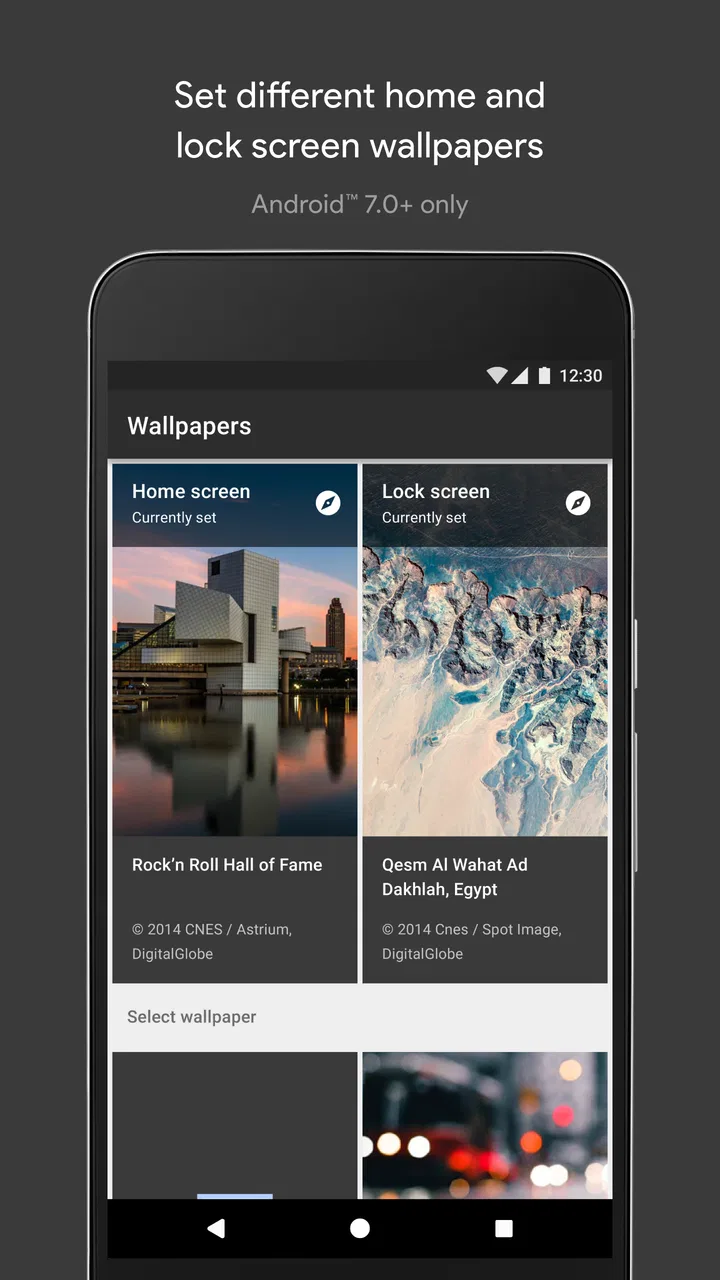
That separation is one of the most practical details for everyday users. The lock screen and home screen serve different purposes. The lock screen can handle a stronger image because I usually look at it briefly, while the home screen benefits from visual breathing room. Using the same image everywhere is easy, but it is not always the most readable arrangement. Wallpapers gives the customization process enough flexibility to make that distinction useful without forcing me into a complicated editor.
The app also benefits from being made by Google. That does not automatically make every design choice perfect, but it gives the experience a sense of belonging on Android devices. The controls feel less like an unrelated utility and more like an extension of the system’s personalization settings. For someone setting up a new phone, changing a background, or helping a family member make a device feel familiar, that familiarity reduces friction.
Its store reputation reflects that broad appeal. Wallpapers holds a 4.1 average from around 290 thousand ratings, alongside roughly 9.9 thousand written reviews. I would not treat those figures as proof that every user will love it, but they do match my impression: this is a dependable, mainstream tool with enough polish to satisfy casual users, while its narrower feature set may disappoint enthusiasts.
A practical setup workflow
A useful way to approach the app is to start with the phone’s purpose. If I want a work-friendly setup, I look for a background that keeps the upper and central areas calm, because that is where icons and widgets compete for attention. For a personal phone, I can accept more character, but I still check whether the image makes small labels difficult to read. This small pause prevents the common mistake of choosing a beautiful wallpaper that makes the entire interface feel messy.
When I review a candidate, I do not judge it only in the selection screen. I imagine the phone in three situations: outdoors in bright light, at night with reduced brightness, and while quickly searching for an app. A dark, detailed image may be comfortable at night but lose definition in sunlight. A pale image may look elegant but reduce the visual separation between icons. The best choice is often not the most dramatic one; it is the one that remains comfortable after a week of repeated use.
There is also a useful rhythm to changing backgrounds. I prefer making one deliberate change rather than constantly rotating images. A new wallpaper can refresh a familiar phone, but frequent changes can make the interface feel unsettled, especially when widgets and icon colors already create visual movement. Wallpapers works well for occasional refreshes because it does not demand a complicated maintenance routine.
Another practical tip is to check the crop before applying anything. Phone screens vary in aspect ratio, and an image that looks balanced in its original composition may place the important subject too close to an edge after fitting the display. If a face, building, or horizon is central to the picture, I pay particular attention to how the framing behaves. This is one of the reasons a dedicated wallpaper tool is more convenient than downloading random images from a browser.
You May Also Like

 Lords Mobile: Kingdom Wars
Lords Mobile Is a Kingdom-Building Routine, Not a Quick Match
A case-by-case verdict on the building, battles, device demands, and social commitments that make Lords Mobile rewarding for some players and exhausting for others.

 PDF Scanner app - TapScanner
TapScanner Makes Paperwork Easier to Capture, Check, and Share
TapScanner makes scanning with a phone feel less like a rescue operation and more like a dependable step in getting work done. Its capture tools are useful, though not flawless.

 Block Blast!
Block Blast! Shows How Much a Puzzle Game Can Leave Out
A quiet grid game shows why puzzle players increasingly value instant clarity, repeatable skill and low-pressure play—and where the genre still needs to catch up.

 Family Space
Family Space Review: A Shared Routine That Makes Family Life Easier
A parenting app earns its place not by adding more noise, but by making everyday coordination easier. Family Space gets that balance mostly right.

 1Weather Forecasts & Radar
1Weather Forecasts & Radar Makes the Daily Check Worthwhile
A good forecast does more than predict rain. This week's pick turns changing conditions into a clear, practical reason to check before you step outside.

 Clash of Clans
Clash of Clans Makes Patience Part of the Strategy
A village builder with a sharp tactical core, Clash of Clans turns patience into momentum and each raid into a small, satisfying act of judgment.
More From Our News Desk
View All News


Where it compares well with ordinary alternatives
The usual alternative is to search the web, save an image, and set it manually through the gallery or system settings. That approach offers a much larger universe of pictures, but it also introduces more decisions. I have to judge image quality, cropping, source reliability, and whether the picture was actually created with a phone screen in mind. Wallpapers removes much of that work, which is valuable when the goal is simply to improve the phone’s appearance.
General photo apps are better if I want to use a personal memory, a travel photograph, or an image I have edited myself. They give me control over the source material, while Wallpapers is more curated and guided. Dedicated wallpaper marketplaces can go further in terms of themes, novelty, and specialized visual styles, but they may feel busier and less immediate. For a quick, low-effort change, Google’s approach is calmer.
That calmness is important for people who dislike aggressive customization. Some wallpaper services are built around endless browsing, animated previews, creator pages, collections, and extra visual effects. Those features can be enjoyable, but they can also turn a simple choice into a distraction. Wallpapers is strongest when I want the background to support the phone rather than become the phone’s main entertainment.
It is also a sensible option for someone who does not want to install several separate tools just to change a background. The app is free, and its Everyone age rating makes it an uncomplicated recommendation for households with different users. I would still encourage parents to supervise general device use, but there is nothing about the basic purpose of this app that makes it feel aimed at a narrow age group.
The meaningful limitations
The same simplicity that makes Wallpapers approachable can make it feel restrained. If I want to combine several images, add text, create a custom color treatment, or build a precise layout around a widget, I would look elsewhere. This is not the app I would choose for a full design workflow. It helps me select and apply a background; it does not replace a proper image editor or a specialized creative tool.
Choice can also be subjective. A curated collection may feel polished to one person and predictable to another. Users with very specific tastes—minimal monochrome graphics, niche illustrations, fandom artwork, photographic collections from a particular place—may reach the limits of the selection quickly. In that situation, a personal gallery or a specialist wallpaper community will offer more control and variety.
There is a second trade-off in relying on a system-oriented app: the exact experience can depend on the Android phone and its software design. Wallpapers is associated with Google’s Android ecosystem, so I would not assume that every manufacturer presents the same controls or visual behavior. If your phone uses a heavily customized interface, some parts of the process may feel different from what you see on a Google-focused device. That is not necessarily a defect, but it is worth remembering when comparing reviews or instructions.
I also would not install it expecting dramatic motion or elaborate personalization. People who specifically want animated scenes, interactive backgrounds, themed icon packs, or extensive visual effects will probably be happier with a purpose-built alternative. Those tools can provide a richer experience, but they may require more setup and may be less comfortable for someone who values a quiet, uncluttered home screen.
My biggest criticism is therefore not that Wallpapers does something badly. It is that the app’s ambitions are modest. Once I have found a background that suits me, there may be little reason to return until I want another change. That is perfectly acceptable for a utility, but it means the app is not designed to become a daily destination.
Who should use it, and who should skip it
I think Wallpapers is particularly good for first-time Android users, people setting up a new device, and anyone who wants a tasteful change without learning a design tool. It is also useful for families where one person wants to help another personalize a phone quickly. The straightforward approach makes it easier to explain: browse, consider the screen layout, choose the destination, and apply the result.
It suits users who value consistency as well. If I want the background to feel like part of the phone’s overall interface, rather than a separate image pasted behind it, the app’s system-minded approach is appealing. A restrained image can make widgets easier to read and can help a crowded home screen feel more organized. That is a subtle benefit, but it is the kind of improvement I notice over time.
I would skip it if my main requirement is unlimited variety. Someone who changes wallpapers every day, collects artwork from independent creators, or wants highly specific themes will likely find a broader source more rewarding. I would also choose another tool if I needed to design a custom background from scratch. Wallpapers can be part of that workflow as a place to start, but it is not a substitute for editing software.
For people concerned about cost, the answer is easy: the app is free. That makes it low-risk to try, especially if the alternative is downloading several paid or ad-heavy customization tools before knowing what kind of experience you prefer. I still think the right decision depends on expectations. Free and convenient does not mean infinitely configurable, and the app is most satisfying when its focused purpose matches what you need.
My final verdict after using it
Wallpapers succeeds because it understands that most people do not want a wallpaper project. They want a background that looks good, fits the screen, and can be changed without unnecessary effort. Google LLC has kept the experience approachable enough for casual users while offering more practical control than simply picking a random image from a photo gallery.
Its strongest qualities are the focused browsing experience, the ability to think separately about the lock screen and home screen, and the way it encourages choices that work with the rest of the interface. Its weaknesses are equally clear: limited creative depth, less appeal for highly specialized tastes, and no reason for enthusiasts to treat it as their only customization tool.
The app has been available since October 19, 2016, and its continued popularity is understandable. It is a mature, free personalization choice rather than an ambitious visual playground. I would recommend it to a friend who wants an easy, clean Android refresh and does not want to sort through complicated alternatives. If that sounds like you, install it first. If you already know you need custom compositions, animated scenes, or a very niche art collection, start with a more specialized option instead.
My verdict: choose Wallpapers for dependable, low-effort personalization, but do not mistake its polished simplicity for a complete wallpaper studio.
FAQs for Wallpapers
01What features does the Wallpapers app offer?
The Wallpapers app provides a curated collection of high-quality images, including categories such as nature, abstract, and urban landscapes. Users can easily browse, download, and set images as their device's background. Additional features include daily wallpaper updates, the ability to save favorites, and options for automatic wallpaper rotation.
02Is the Wallpapers app free to use?
While the Wallpapers app is free to download and use, it offers in-app purchases and a subscription model for premium features. These may include ad-free browsing, exclusive wallpaper collections, and early access to new content. Free users can still access a wide range of high-quality wallpapers.
03How often are new wallpapers added to the app?
The Wallpapers app is updated daily with new images, ensuring a fresh and diverse selection for users. The frequency of updates may vary depending on the category, but the app strives to provide regular additions to keep the content exciting and relevant. Subscribers may receive exclusive early access to new collections.
04Does the Wallpapers app impact device performance or battery life?
The Wallpapers app is optimized to minimize its impact on device performance and battery life. While setting live wallpapers or enabling automatic rotation can slightly increase battery usage, the app is designed to be efficient. Users can adjust settings to suit their preferences and conserve battery life.
05Are the wallpapers in the app high-quality and suitable for all devices?
Yes, the Wallpapers app offers high-resolution images suitable for various device screen sizes, including smartphones and tablets. The app ensures that wallpapers are crisp and clear, maximizing visual appeal on any device. Users can select and preview wallpapers to ensure optimal fit before applying them.
Pros
- Extensive collection of high-quality images.
- User-friendly interface with easy navigation.
- Regular updates with trending wallpapers.
- Option to customize and save favorites.
- Minimal ads for an uninterrupted experience.
Cons
- Limited offline access to downloaded wallpapers.
- Some features locked behind a paywall.
- Occasional app crashes on older devices.
- In-app purchases can add up quickly.
- Limited resolution options for some wallpapers.

Wallpapers
Gallery